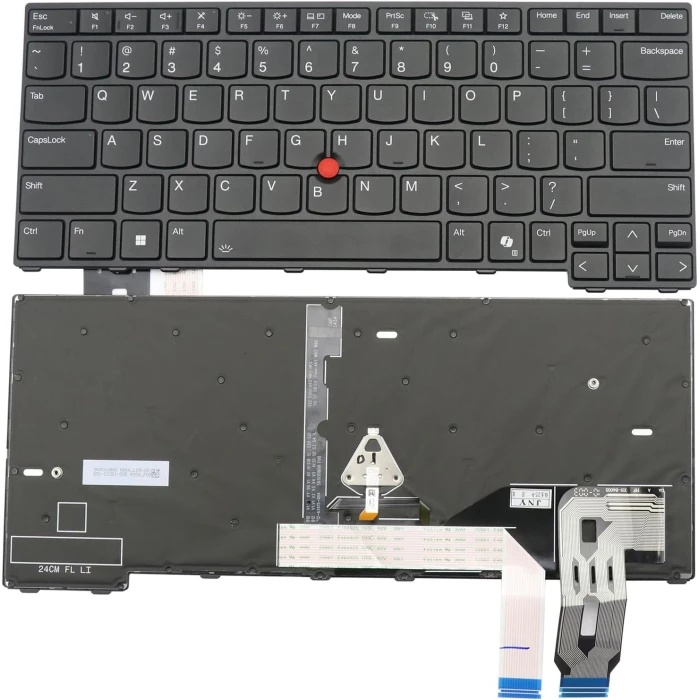
Backlit
US

ThinkPad L14 Gen 7 is a genuine replacement keyboard designed for your laptop. This model is manufactured to the highest quality standards and is 100% compatible with the original device.
Key Features
Quick Check Before You Buy
① Match your laptop model (see compatibility tab).
② Compare our photos with your keyboard – check Enter key shape, language layout, and screw holes.
③ Basic installation skills needed; pro installation advised if unsure.
⚠️ Must‑Know Differences
Need help identifying your layout? Use our Keyboard Layout Query System – search by language, country code, or Chinese name to find your exact layout.
If you are unsure about compatibility, send us a photo of your original keyboard (top and back) – we'll verify and recommend the correct part.
| Compatible models | Lenovo Thinkpad L14 Gen 6 Series Lenovo Thinkpad L14 Gen 6 Type 21S6 Lenovo Thinkpad L14 Gen 6 Type 21S7 Lenovo Thinkpad L14 Gen 6 Type 21S8 Lenovo Thinkpad L14 Gen 6 Type 21S9 Lenovo Thinkpad P14s Gen 6 Series Lenovo Thinkpad P14s Gen 6 Type 21QL Lenovo Thinkpad P14s Gen 6 Type 21QM Lenovo Thinkpad P14s Gen 6 Type 21RV Lenovo Thinkpad P14s Gen 6 Type 21RW Lenovo Thinkpad T14 Gen 6 Series Lenovo Thinkpad T14 Gen 6 Type 21QC Lenovo Thinkpad T14 Gen 6 Type 21QD Lenovo Thinkpad T14 Gen 6 Type 21QG Lenovo Thinkpad T14 Gen 6 Type 21QH Lenovo Thinkpad T14 Gen 6 Type 21QJ Lenovo Thinkpad T14 Gen 6 Type 21QK Lenovo Thinkpad T14 Gen 5 Type 21MC Lenovo Thinkpad L14 Gen 5 Type 21L1 Lenovo Thinkpad P14s Gen5 Type 21G2 Lenovo Thinkpad T14 Gen 5 Type, 21MD Lenovo Thinkpad L14 Gen 5 Type 21L2 Lenovo Thinkpad P14s Gen5 Type 21G3 Lenovo Thinkpad T14 Gen 5 Type 21ML Lenovo Thinkpad L14 Gen 5 Type 21L5 Lenovo Thinkpad P14s Gen5 Type 21ME Lenovo Thinkpad T14 Gen 5 Type 21MM Lenovo Thinkpad L14 Gen 5 Type 21L6) Lenovo Thinkpad P14s Gen5 Type 21MF |
How to choose the right keyboard for your laptop
Look at the bottom of your laptop for the exact model number (e.g., HP Pavilion 15, Dell Latitude 5400). This is the first step to find compatible keyboards.
Remove the keyboard (if possible) or check its back side for a part number (e.g., L11166-001, 16-AY). This is the most reliable way to match the exact keyboard.
Visit our Keyboard Layout Query System to search by language, country code, or Chinese name – it helps identify the exact layout.
Always compare our product photos with your original keyboard – check the language layout, Enter key shape, spacebar length, and mounting holes. Even if the model matches, these details can vary.
Choose the correct language layout (US, UK, DE, FR, etc.). Even if the laptop model matches, layouts differ – ensure the key labels and positions match your original keyboard.
Check if your original keyboard has backlight. Backlit keyboards require a different model – installing a non‑backlit keyboard on a backlit laptop may not work, and vice versa.
Some keyboards come with a top frame (integrated palmrest), others are frame‑less. Check your original keyboard – they are not interchangeable.
Big Enter vs Small Enter – European layouts often have a large vertical Enter key, while US layouts have a smaller horizontal one. Must match!
Check the screw hole positions, ribbon cable connector, and flex cable length. Even if the model is the same, different manufacturers may use different mounting points.
Original (higher quality, higher price) vs OEM (affordable, good quality). Choose based on your budget and preference. Both are compatible, but quality may differ.
The same laptop model can have different keyboards. Our photos are the best reference – check the layout, Enter key, and connector before purchasing.
If you're unsure about the layout, visit our Keyboard Layout Query System to find your exact layout by language code or country.
Different manufacturers supply the same model keyboard. The sticker/PN may differ, but functionality and compatibility are guaranteed.
Backlit and non‑backlit keyboards are not interchangeable. Ensure your laptop supports backlight and that you order the correct version.