US

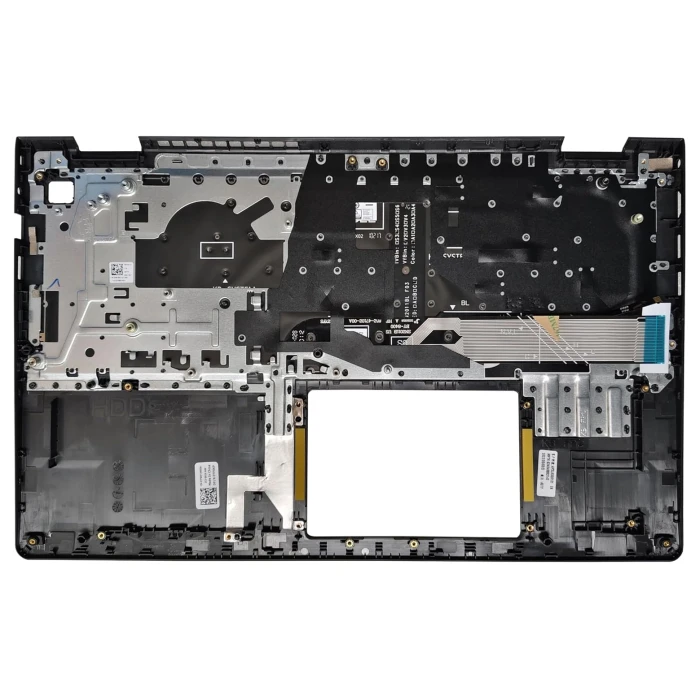
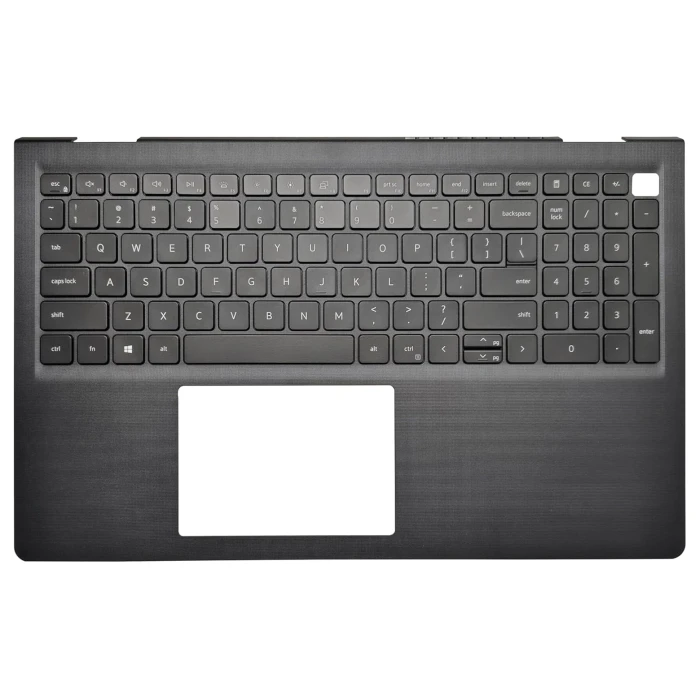
Genuine Dell Vostro 15 3510 / 3515 / 3520 / 3525 / 3511 US Keyboard Palmrest Assembly – 0TPXKP
Restore your Dell Vostro 15 laptop to its original condition with this genuine palmrest assembly featuring a built‑in US‑layout keyboard. Designed for the Vostro 15 3510, 3515, 3520, 3525, and 3511 series, this pre‑assembled top‑case unit replaces a worn, damaged, or malfunctioning keyboard and palmrest area, giving your device a fresh, professional look and reliable typing performance.
Product Overview
Compatible Models:
Dell Vostro 15 3510
Dell Vostro 15 3515
Dell Vostro 15 3520
Dell Vostro 15 3525
Dell Vostro 15 3511
Part Numbers: 0TPXKP / AP3LK000101
Colour: Black
Condition: Brand New / Original OEM
Key Features
Original Dell Quality – Manufactured to Dell’s exact specifications, guaranteeing a perfect fit with all screw mounts, cable routing channels, and chassis contours.
Complete Assembly – Includes the palmrest, US‑English keyboard, and integrated touchpad in one unit, making replacement quick and straightforward.
Standard Keyboard – Features a full US QWERTY layout with responsive key feel, ideal for everyday typing and productivity.
Durable Construction – Made from high‑grade PC/ABS plastic, the palmrest resists everyday wear, scratches, and impact.
Precision Fit – All cutouts for ports, indicators, and the touchpad align perfectly with the laptop’s internal layout, ensuring seamless integration.
Integrated Touchpad – Supports multi‑touch gestures for smooth navigation and responsive control.
Technical Specifications
| Parameter | Detail |
|---|---|
| Compatible Models | Dell Vostro 15 3510, 3515, 3520, 3525, 3511 |
| Part Numbers | 0TPXKP, AP3LK000101 |
| Keyboard Layout | US English (QWERTY) – non‑backlit |
| Material | PC/ABS plastic |
| Colour | Black |
| Condition | New / Original OEM |
Compatibility Notes
This palmrest assembly is exclusively designed for the Dell Vostro 15 3510, 3515, 3520, 3525, and 3511 laptops. Please confirm your laptop model and existing part number before ordering. The assembly includes the palmrest, keyboard, and touchpad as a complete unit – no additional components are required for basic replacement. However, it does not include the system board, battery, storage drives, or other internal hardware; these must be transferred from your original machine.
What's in the Box
1 × Dell Vostro 15 US Keyboard Palmrest Assembly (0TPXKP)
Installation Reminder
Replacing the palmrest assembly requires disassembling the laptop, including removal of the bottom cover, battery, storage devices, wireless card, and system board. We recommend consulting Dell’s service manual or seeking professional assistance to avoid damaging internal components or the new assembly.
Renew your Dell Vostro 15 with a genuine OEM palmrest and keyboard – order now for a perfect fit and reliable performance!
How to choose the right keyboard for your laptop
Look at the bottom of your laptop for the exact model number (e.g., HP Pavilion 15, Dell Latitude 5400). This is the first step to find compatible keyboards.
Remove the keyboard (if possible) or check its back side for a part number (e.g., L11166-001, 16-AY). This is the most reliable way to match the exact keyboard.
Visit our Keyboard Layout Query System to search by language, country code, or Chinese name – it helps identify the exact layout.
Always compare our product photos with your original keyboard – check the language layout, Enter key shape, spacebar length, and mounting holes. Even if the model matches, these details can vary.
Choose the correct language layout (US, UK, DE, FR, etc.). Even if the laptop model matches, layouts differ – ensure the key labels and positions match your original keyboard.
Check if your original keyboard has backlight. Backlit keyboards require a different model – installing a non‑backlit keyboard on a backlit laptop may not work, and vice versa.
Some keyboards come with a top frame (integrated palmrest), others are frame‑less. Check your original keyboard – they are not interchangeable.
Big Enter vs Small Enter – European layouts often have a large vertical Enter key, while US layouts have a smaller horizontal one. Must match!
Check the screw hole positions, ribbon cable connector, and flex cable length. Even if the model is the same, different manufacturers may use different mounting points.
Original (higher quality, higher price) vs OEM (affordable, good quality). Choose based on your budget and preference. Both are compatible, but quality may differ.
The same laptop model can have different keyboards. Our photos are the best reference – check the layout, Enter key, and connector before purchasing.
If you're unsure about the layout, visit our Keyboard Layout Query System to find your exact layout by language code or country.
Different manufacturers supply the same model keyboard. The sticker/PN may differ, but functionality and compatibility are guaranteed.
Backlit and non‑backlit keyboards are not interchangeable. Ensure your laptop supports backlight and that you order the correct version.